MeshLock
Needlepoint canvas printing with every stitch on its own mesh intersection
Prints needlepoint canvas with every stitch colour on its own mesh intersection. MeshLock finds the real weave in a scan of the canvas, measures how far it drifts from a perfect grid, and corrects for it, the printer and the feed before a drop of ink goes down.
- Status
- Ready to pilot
- Built for
- Needlepoint canvas designers, print studios and shops that print their own canvases on a wide-format inkjet such as the Epson SureColor P900.
- Category
- Needlepoint canvas print alignment
The problem
A needlepoint chart is a grid of colours, one per stitch. On canvas, each stitch covers one thread intersection. Printing the chart as an image at the right size sounds like it should work, but real cotton mono canvas is never a perfect grid. Thread spacing varies by a percent or two, the weave bows from rolling and handling, and the printer itself runs a fraction of a percent long or short.
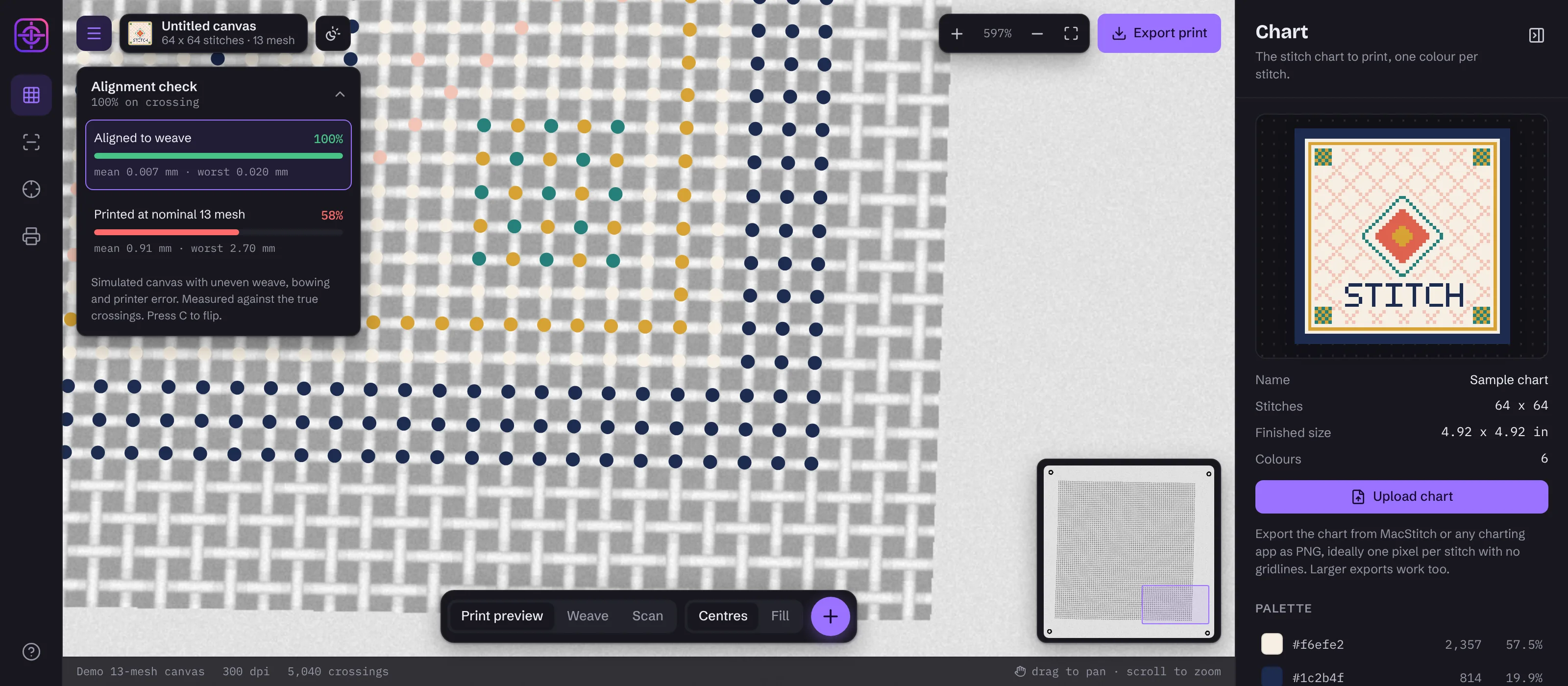
Those small errors add up across the canvas. A colour that starts on its intersection at one corner sits between two threads a few inches later, then lands on the wrong intersection altogether. Stitchers see it as colours split across threads, wobbly borders and lettering that won't read. In our simulation of an ordinary 13 mesh canvas, a print at nominal size put 42% of stitches on the wrong intersection, even with a perfect starting position.
The few companies that fix this keep the process in-house for their own canvases. We wanted to know if it could be done with a flatbed scanner, an off-the-shelf photo printer and software anyone could run. MeshLock is the result: a computer vision and print registration engine that maps every stitch to the intersection it belongs on.
How it works
- 01
Chart
Load the stitch chart as an image exported from MacStitch or any charting app. MeshLock detects the pixels per stitch, rebuilds the chart one colour per stitch and lists the palette with stitch counts.
- 02
Pass 1: rings
With the blank canvas mounted on its carrier, the printer prints four small registration rings around it. Because the printer drew them, they record exactly where this printer puts ink.
- 03
Scan
The canvas is scanned on its carrier at 300 to 600 dpi with the rings in frame. MeshLock finds every thread intersection and every ring in the same scan, which ties the real weave to printer coordinates.
- 04
Pass 2: print
MeshLock exports a full-page PNG or TIFF with each stitch drawn around its own measured intersection. The canvas goes back through the same feed, and check dots confirm on paper that the reload matched pass 1.
What it does
- Detects every thread intersection in a canvas scan, for 13 mesh, 18 mesh or any count from 5 to 40
- Follows uneven thread spacing, bowing and weave angle instead of assuming a perfect grid
- Printer-drawn registration rings absorb printer scale, skew and feed offset automatically
- Each stitch drawn as its own cell, so no colour straddles two intersections
- Print-ready PNG or TIFF at 360 or 720 ppi with the resolution tag set for Epson Print Layout
- Check dots that prove on paper whether the second pass fed like the first
- Saved printer profiles and pass-to-pass trims for repeatable production
- Runs entirely in the browser with no uploads, and can be white-labelled with your own brand
How we built it
Finding the weave with a Fourier transform
Thread spacing shows up as two strong peaks in the 2D frequency spectrum of a scan. MeshLock takes a centre crop, applies a Hann window, runs an FFT and refines both peaks to sub-bin accuracy. Inverting the two frequency vectors gives the thread pitch and angle on both axes, including canvas that isn't square, in about 150 ms.
Following every intersection, not a grid
A single global grid can't follow a canvas that bows. MeshLock blurs the scan at a quarter of the thread pitch so each crossing becomes a local peak, then walks outward from the centre. Each next intersection is predicted from the spacing measured right next to it and snapped to the nearest peak with a sub-pixel fit. Misses from a knot or a speck of lint are filled from their neighbours.
Let the printer measure itself
Scanning the canvas tells you where the threads are, not where the printer will put ink. Pass 1 prints rings that the scan also sees, and a least-squares affine fit maps scan pixels to printer coordinates. Printer scale error, skew and feed offset are measured instead of guessed, and a ring fit under 0.1 mm confirms the scan is sound.
One colour per intersection
Each stitch is drawn as a cell whose corners are shared with its neighbours, averaged from the four surrounding intersections. Cells tile the canvas with no gaps and no overlaps, and each colour stays centred on its own crossing. Coverage can be reduced so colour sits tighter on the intersection.
Measured against ground truth
We built a canvas simulator with known errors: 1% uneven thread count, bowing, thread-to-thread unevenness, a printer 0.4% short and 0.35 mm off, and a scanner placed crooked. On 13 and 18 mesh simulated canvas, MeshLock located intersections to 0.007 mm on average and put 100% of stitches on their own intersection, with a worst case of 0.02 mm. A nominal print put about 40% on the wrong one.
Computer vision without AI
There is no machine learning model in MeshLock. Every step is deterministic signal processing and geometry, so it needs no training data, explains its own results, and gives the same answer every time. The engine runs in a Web Worker in the browser, so a 4-megapixel scan is analysed in about a second without leaving the user's machine.
MeshLock: common questions
How do you print a needlepoint canvas so the colours line up with the mesh?
Measure the canvas instead of assuming it. Scan the blank canvas, find every thread intersection, and place each stitch colour on its own measured intersection. Then print registration marks on a first pass so the printer's own scale and feed errors are measured too. MeshLock does all of this from one flatbed scan.
Why do printed needlepoint canvases drift off the intersections?
Cotton mono canvas is woven, not machined. Thread spacing varies by one or two percent, the weave bows, and printers run slightly long or short. Each error is tiny, but across 60 or 100 stitches it adds up to a full thread or more, so colours split across threads or land on the wrong intersection.
Does MeshLock work with 13 mesh and 18 mesh canvas?
Yes. It has presets for 13 and 18 mesh and accepts any count from 5 to 40 threads per inch. The mesh count is only a starting hint, because MeshLock measures the real thread spacing of each canvas from the scan.
Which printer does MeshLock need?
Any inkjet that prints at exact size and feeds a mounted canvas the same way twice. It was designed around the Epson SureColor P900, and it exports PNG or TIFF with the resolution set so Epson Print Layout prints at 100% without rescaling.
Does MeshLock use AI?
No. MeshLock uses classical computer vision: a Fourier transform to find the weave, peak tracking to follow each intersection, and geometric fitting to register the printer. It needs no training data and gives the same answer every time.
Can I use charts from MacStitch?
Yes, exported as PNG. MeshLock detects how many image pixels make up each stitch and rebuilds the chart one colour per stitch. Direct import of MacStitch .chart and OXS files is on the roadmap.
How accurate is MeshLock?
In simulation with known errors, MeshLock placed every stitch on its own intersection with an average error of 0.007 mm and a worst case of 0.02 mm, on both 13 and 18 mesh. A print at nominal size put around 40% of stitches on the wrong intersection. Results on real canvas depend on how repeatably the canvas is reloaded for the second pass.
Can I try MeshLock?
Yes. The studio runs in your browser with a simulated canvas, so you can see the alignment and compare it with a nominal print. Upload your own chart and a scan of your canvas to try it on your material. Nothing is uploaded to a server.
Can Labvent build computer vision or print registration software for our business?
Yes. MeshLock's core techniques, finding structure in scans, sub-pixel measurement and registering one coordinate system to another, apply to inspection, scanning, document and label registration and print alignment well beyond needlepoint. Tell us what you need to measure, and we'll scope a proof of concept.